Percival AI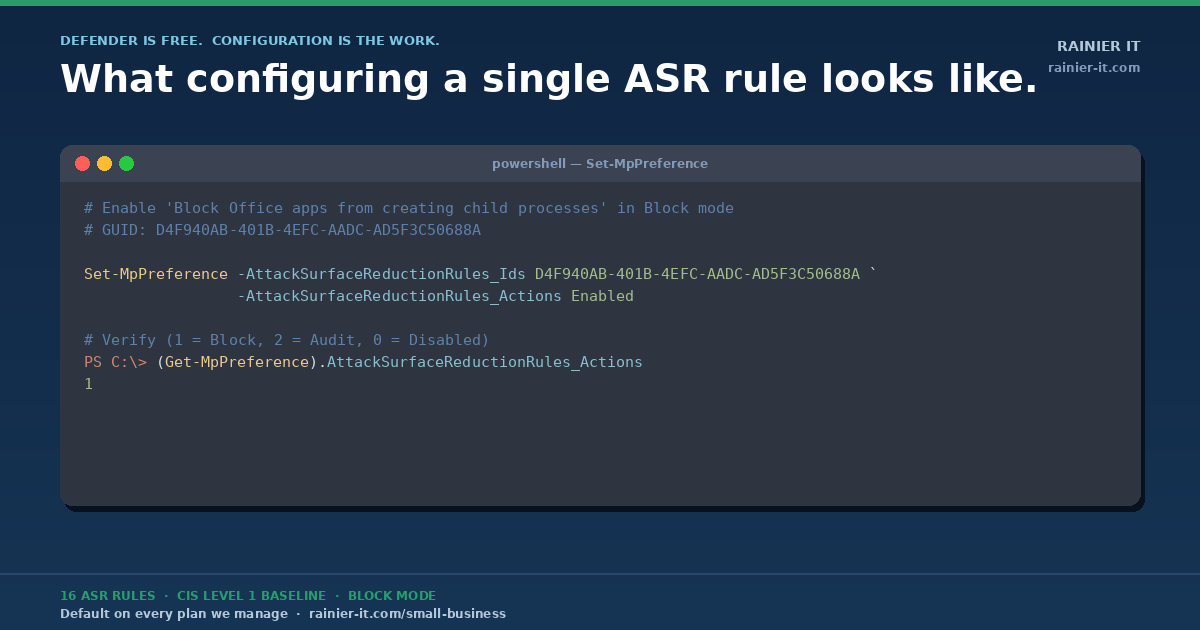
Walk into any small business in Pierce County and ask the owner what’s protecting their computers. They’ll usually say “we have antivirus.” Press a little: which antivirus? “I think it’s the Microsoft one.” Yes — that’s Microsoft Defender, and it’s been built into every Windows machine since Windows 10. It’s free. It’s already running on every PC they own.
And yet small business breach rates keep climbing. 88% of SMB breaches in 2025 involved ransomware — versus just 39% at large enterprises. So what’s going wrong?
The short version: Microsoft Defender ships with permissive defaults. Microsoft built it to be polite — to not break legacy software, to not pop alerts that confuse users, to play nicely with whatever weird apps a business might still be running from 2014. The defaults are tuned for “first, do no harm.” That’s a reasonable choice for a product that has to ship to a billion machines. It’s a terrible choice for a security baseline.
Out of the box, Defender catches roughly half of what it could catch. The product isn’t the weak link. The configuration is.
What “good configuration” actually means
This is the gap that matters: anyone can install antivirus. The work — the part you’re paying a managed IT provider for — is making sure it’s actually configured to do its job. There are two layers to that work:
- The CIS Level 1 baseline — turning every Defender knob to the security industry’s recommended setting.
- 16 Attack Surface Reduction (ASR) rules — Microsoft’s specific “block this attack pattern” toggles, deployed in Block mode (not just Audit).
Let’s walk through both.
Microsoft Defender — what the product actually is
Defender is Microsoft’s built-in endpoint protection. It ships with Windows 10 and Windows 11 at no additional cost. Under the hood, it includes:
- Antivirus + anti-malware (signature + heuristic)
- Behavior monitoring (catches malicious patterns even with no signature match)
- Network protection (blocks connections to known-malicious destinations)
- Exploit protection (mitigates memory-corruption attacks)
- EDR sensor capability (telemetry suitable for managed-detection layering)
- Cloud-delivered protection (samples submitted to Microsoft for behavioral analysis)
Defender consistently ranks in the top quadrant of independent endpoint-protection tests (AV-Comparatives, AV-TEST, MITRE ATT&CK evaluations). It’s a serious enterprise product. The same Microsoft that runs LinkedIn, GitHub, half the world’s cloud infrastructure, and the largest threat-intelligence telemetry on the planet built it.
The product is not the problem. Configuration is.
CIS Level 1 hardening — the configuration recipe
CIS = Center for Internet Security. A US-based nonprofit. They publish the most-cited security configuration baselines in the industry. Used by:
- The federal government (FedRAMP, NIST 800-53)
- The Department of Defense (DISA STIGs reference CIS)
- Cyber-insurance underwriters (the questionnaire you fill out at renewal)
- Every major compliance framework — HIPAA, PCI-DSS, SOC 2, CMMC
CIS publishes Benchmarks — versioned recipe books that say “here is how to configure X securely, with the exact settings, in plain language, with rationale for each one.” There’s a benchmark for Microsoft Windows, one for Microsoft 365, one for Linux distros, one for AWS, one for Microsoft Defender specifically.
The Windows benchmark has two levels:
- Level 1 (L1) — “every business should have this on. No compatibility tradeoffs. No good reason not to.”
- Level 2 (L2) — “more aggressive. May break some legacy software. For compliance-driven environments.”
We deploy L1 by default for every client. L2 we layer on for clients with regulated data (HIPAA-adjacent practices, contractors with CMMC obligations, etc.).
For Defender specifically, the L1 benchmark enforces things like:
- Real-time protection ON
- Cloud-delivered protection ON (samples submitted for behavioral analysis)
- Tamper protection ON — prevents users or malware from disabling Defender
- Network protection in Block mode (not Audit — actually blocking, not just logging)
- Controlled Folder Access ON (ransomware mitigation)
- Scan removable drives, scan archive files
- PUA (potentially unwanted application) protection ON
- SmartScreen for Microsoft Edge ON
- Specific scan schedules, signature update intervals, sample submission policies
None of this is exotic. None of it costs extra. It’s all already in Defender. The question is whether anyone has actually flipped the switches.
The 16 Attack Surface Reduction (ASR) rules
ASR is a specific Defender feature — a set of rules where each one blocks one specific attacker technique. Microsoft maintains them, updates them, and ships them with Windows. They have to be explicitly enabled, and each rule has three modes: Off, Audit (log but don’t block), and Block (actually stop the behavior).
We deploy 16 ASR rules in Block mode on every endpoint we manage. Here’s what each one does, in plain English:
| Rule (plain English) | What it blocks |
|---|---|
| Block executables from email/webmail | The classic “open this attachment” malware vector |
| Block Office apps from creating child processes | Word/Excel can’t spawn cmd.exe / powershell.exe — kills macro-based attacks |
| Block Office apps from creating executable content | Stops Office from writing .exe files to disk |
| Block Office apps from injecting code into other processes | Process injection — common malware persistence |
| Block JS/VBScript from launching downloaded executables | Drive-by download protection |
| Block execution of obfuscated scripts | Obfuscation = “I’m trying to hide what I’m doing” |
| Block Win32 API calls from Office macros | The technique behind 90% of “open the doc, get pwned” attacks |
| Block credential stealing from LSASS | Defends against Mimikatz-style password dumping |
| Block process creation from PSExec / WMI commands | Lateral movement (how attackers spread between PCs after first foothold) |
| Block untrusted/unsigned processes from USB | “Found a USB stick in the parking lot” attack |
| Block Outlook/communication apps from creating child processes | Outlook can’t be tricked into launching attached payloads |
| Block Adobe Reader from creating child processes | PDF-borne malware |
| Block persistence through WMI event subscription | Persistent malware that survives reboots |
| Use advanced ransomware protection | Behavioral heuristics on file-mass-encryption patterns |
| Block exploited vulnerable signed drivers | The “Bring Your Own Vulnerable Driver” technique |
| Block rebooting machine in Safe Mode (newest addition) | Prevents attackers from booting around your security |
Inside one rule: what enabling “Block Office apps from creating child processes” actually looks like
For the technically inclined — here’s the actual PowerShell one of our TacticalRMM scripts runs to enable that rule on a managed endpoint:
# Enable "Block all Office applications from creating child processes" in Block mode
# Microsoft GUID for this rule: D4F940AB-401B-4EFC-AADC-AD5F3C50688A

Set-MpPreference -AttackSurfaceReductionRules_Ids D4F940AB-401B-4EFC-AADC-AD5F3C50688A `
                 -AttackSurfaceReductionRules_Actions Enabled

# Verify the rule is enabled (1 = Block, 2 = Audit, 0 = Disabled)
(Get-MpPreference).AttackSurfaceReductionRules_Ids
(Get-MpPreference).AttackSurfaceReductionRules_ActionsThe whole rule comes down to a single PowerShell command. We bake all 16 into a TacticalRMM script that runs at onboarding, then runs again weekly to drift-correct anything a user might have toggled off. The “configuration is the work” part is doing this consistently across every endpoint, every week, for every client — and having the audit logs to prove it when the cyber-insurance auditor asks.
The full 16 GUIDs (for the technically curious or your auditor)
Each ASR rule has a Microsoft-assigned GUID. Here are the 16 we deploy:
BE9BA2D9-53EA-4CDC-84E5-9B1EEEE46550  Block executable content from email + webmail
D4F940AB-401B-4EFC-AADC-AD5F3C50688A  Block all Office apps from creating child processes
3B576869-A4EC-4529-8536-B80A7769E899  Block Office apps from creating executable content
75668C1F-73B5-4CF0-BB93-3ECF5CB7CC84  Block Office apps from injecting code into other processes
D3E037E1-3EB8-44C8-A917-57927947596D  Block JS/VBScript from launching downloaded executable content
5BEB7EFE-FD9A-4556-801D-275E5FFC04CC  Block execution of potentially obfuscated scripts
92E97FA1-2EDF-4476-BDD6-9DD0B4DDDC7B  Block Win32 API calls from Office macros
9E6C4E1F-7D60-472F-BA1A-A39EF669E4B2  Block credential stealing from LSASS
D1E49AAC-8F56-4280-B9BA-993A6D77406C  Block process creations from PSExec + WMI commands
B2B3F03D-6A65-4F7B-A9C7-1C7EF74A9BA4  Block untrusted/unsigned processes from USB
26190899-1602-49E8-8B27-EB1D0A1CE869  Block Office communication apps from creating child processes
7674BA52-37EB-4A4F-A9A1-F0F9A1619A2C  Block Adobe Reader from creating child processes
E6DB77E5-3DF2-4CF1-B95A-636979351E5B  Block persistence through WMI event subscription
C1DB55AB-C21A-4637-BB3F-A12568109D35  Use advanced ransomware protection
56A863A9-875E-4185-98A7-B882C64B5CE5  Block abuse of exploited vulnerable signed drivers
33DDEDF1-C6E0-47CB-833E-DE6133960387 Block rebooting machine in Safe Mode (newest)Drop those into a script, push them via your RMM, drift-correct weekly. That’s the whole baseline.
What this means for your business
If you take nothing else from this post, take this: “we have antivirus” is not a security strategy. Defender on its defaults catches half of what it could. Defender configured to CIS L1 + 16 ASR rules in Block mode catches a meaningful chunk of what your cyber-insurance carrier asks about at renewal — and what your business needs to not become next quarter’s breach statistic.
This is the foundation that ships with every plan we offer — from Business Watch at $99/month for a 3-device shop, all the way through Enterprise. On top of that foundation, Shield, Fortress, and our per-user plans layer on Huntress 24/7 SOC, Managed ITDR, and the rest of our defense-in-depth stack.
If you’re a Pierce County small business and want to know whether your endpoints are actually configured this way — or if you just want a free 30-minute conversation about what your security posture looks like today — we’d love to talk.
Sources: CIS Microsoft Windows Desktop Benchmark; Microsoft Defender ASR rules reference; Verizon 2025 Data Breach Investigations Report (SMB Snapshot).