Christopher Engelhardt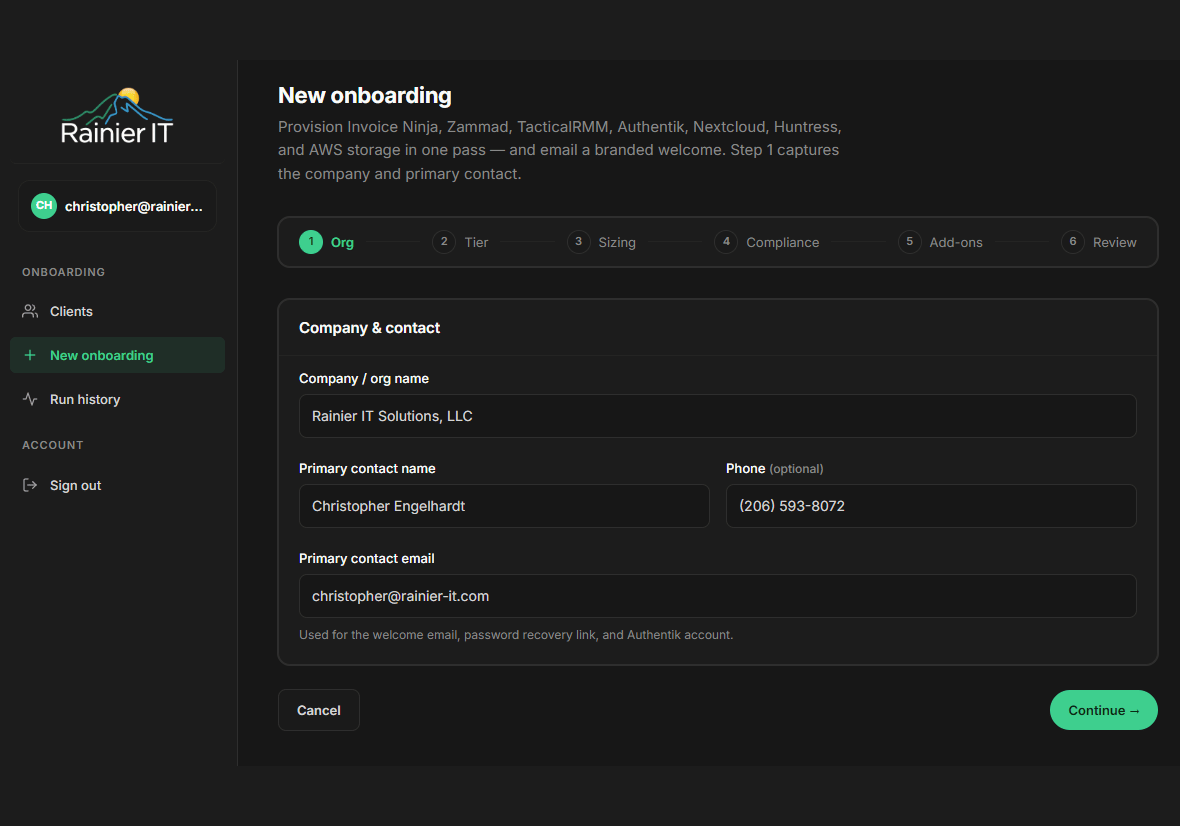
When a new client signs with us, they’re often expecting the next step to be a calendar invite for a “kickoff call” two weeks out. Instead, what they get is a welcome email — and by the time they finish reading it, every device they own is provisioned to be protected, monitored, and backed up. The whole thing takes under twenty minutes.
This is what we changed.
🚀 What onboarding used to look like
For most managed IT shops, onboarding is a project. There’s a kickoff meeting. There’s a “discovery phase.” There’s a spreadsheet of usernames and license keys passed back and forth between three vendors. Somewhere in week two, a tech finally shows up to a workstation, opens a remote session, and starts installing things one at a time.
During those two weeks, the client thinks they’re protected. They aren’t.
We rebuilt our onboarding because that gap is unacceptable in 2026. Cyber-insurance carriers ask whether your endpoints have endpoint-detection-and-response actively running on the day a claim hits. The honest answer for “the first two weeks” used to be no. That’s a denied claim waiting to happen.
Behind the green button
Our internal staff onboarding tool — affectionately called the board — is a six-page form. Company name, contact, tier, compliance profile, sizing, add-ons, review. Click Run.
What happens after that click takes about four minutes, all in parallel:
- Your billing record is created in our invoicing system, with the right tax handling and renewal cadence.
- A support organization is provisioned in our ticket system, and your primary contact becomes a customer with a real account, ready to email-or-chat support.
- A client space is registered with our remote-management platform, complete with a one-time-use 90-day enrollment URL that’s used to securely connect each of your Windows machines.
- A managed Endpoint Detection & Response organization is created with our SOC partner, so the moment an agent comes online, a 24/7 team starts watching for threats.
- A shared workspace is created in our Nextcloud — a private, encrypted file-sharing platform — pre-loaded with your welcome packet, getting-started guide, and the per-client Windows installer.
- A single sign-on account is provisioned for your contact, with a one-time link to set their password. The same login gets them into the portal, the knowledge base, the file share, and the ticketing system.
- AWS-side backup infrastructure is provisioned: a per-client storage prefix, a dedicated encryption key (for HIPAA/PCI clients), and a unique repository password stored in AWS Secrets Manager.
- A welcome email goes out — multipart HTML and plain-text, branded, with a “Set Your Password” button and an “Open Your Folder” link.
Nine separate systems. Zero spreadsheets. One click.
What’s actually in the installer your team runs
The shared folder we created for you contains a single PowerShell file: install-rainier-agents.ps1. An admin runs it once on each Windows PC. Five things happen in sequence — all idempotent (safe to re-run), all logged to C:\ProgramData\RainierIT\.
TacticalRMM — the ops control plane
TacticalRMM is what we use to remotely monitor and manage every machine we cover. It’s the piece that lets us patch a server at 2 a.m. without you knowing, deploy a software update across forty endpoints with one click, run diagnostics on a misbehaving laptop without making the user stop working, or push a script to fix something across your whole fleet in seconds. It’s also what feeds our automated alerts: if a server runs out of disk, if a backup fails, if Windows Update gets stuck — we know before you do.
The agent installs in about ninety seconds, runs as a system service, and uses a few megabytes of memory. You’ll never notice it. We will.
Microsoft Defender — secure baseline + ASR rules
Defender is built into Windows and is genuinely good antivirus — when it’s configured correctly. Most of the value lives in features that aren’t enabled by default: Tamper Protection (which prevents malware from disabling the antivirus), cloud-delivered protection (which catches threats minutes after Microsoft’s detection cluster sees them anywhere in the world), and especially Attack Surface Reduction rules.
ASR rules are Microsoft’s underrated answer to the techniques real attackers actually use. They block:
- LSASS credential theft — the technique behind almost every “the attacker had domain admin within an hour” story
- Office files spawning child processes — the actual vehicle for most macro-based ransomware
- Email-attached executables running directly
- Office applications creating executable content
- WMI persistence — the silent foothold technique attackers use to survive reboots without dropping any file
- USB-launched processes
- And several more.
Our installer applies thirteen of Microsoft’s sixteen ASR rules — in block mode for the high-confidence ones and audit mode for the few that occasionally false-positive on legitimate business apps. Audit-mode rules graduate to block-mode after we’ve watched them for a few weeks on your specific environment.
Huntress Managed EDR — 24/7 human SOC
Defender catches things by signature and by Microsoft’s machine-learning models. Huntress catches what those miss — the slow, quiet attacks that look legitimate to a tool but obvious to a trained human looking at the right telemetry.
Huntress sends every Run-key registry change, every new scheduled task, every WMI subscription, every Windows service installation to their Security Operations Center. A real analyst looks at every alert. When Huntress decides something is wrong, the average time to first response is under eight minutes. The false-positive rate is under one percent — meaning when their team contacts us, it’s almost always a real attack, and we (and you) can act on it immediately.
This is the piece your cyber-insurance application asks about. “Do you have a managed EDR with 24/7 SOC?” — yes, you do.
Action1 — patching for everything Microsoft doesn’t cover
Windows Update handles Microsoft’s stuff. Action1 handles the rest. Chrome, Firefox, Adobe Reader, Zoom, Teams, Slack, the dozen-odd line-of-business apps your team uses, the runtime libraries (Java, .NET, Visual C++), the seventh-party tools you don’t even remember you use. Each one gets a fresh CVE every couple of months. Action1 deploys their updates the moment they’re available, on a schedule that doesn’t interrupt your team.
If you’ve ever seen a Verizon Data Breach Investigations Report, you’ve seen the recurring finding: most successful intrusions exploit a vulnerability for which a patch existed for over a month. Action1 is the difference.
Restic + AWS S3 — encrypted, ransomware-survivable backups
Backups are the difference between a ransomware incident being a long Tuesday and a fatal event for the business. Most “we have backups” plans don’t survive a real attack because the backups are reachable from the same network the attackers are on.
Our backup architecture is:
- Restic runs on every covered endpoint as a SYSTEM-level scheduled task at 02:00. Backups are deduplicated and encrypted on the endpoint before they leave the machine.
- The encrypted blocks are sent to Amazon S3, in our HIPAA-eligible AWS environment, into a per-client storage prefix.
- The encryption key for each backup is unique to your business — managed by AWS Key Management Service, with retention controls that meet healthcare regulatory requirements where applicable.
- Old snapshots are pruned on a 30-day or 90-day schedule depending on your tier (whole-system backups keep 90 days; user-profile-only keeps 30).
- The endpoint never holds the password in plaintext — it’s fetched from AWS Secrets Manager at backup time and lives only in memory while the backup runs.
If ransomware encrypts every machine in the office tomorrow, the backups in AWS are unreachable to the attacker — they have no AWS credentials, no encryption keys, and the on-endpoint passwords are scoped to write-only-to-your-own-prefix.
🔒 What this means for your security
Three things in that list are architecturally different from how most managed-IT shops do it. They’re worth understanding because they’re the difference between defensible security and security-theater:
Your encryption key is yours, not ours, not shared. For HIPAA, PCI, and GDPR-strict clients, every backup is encrypted with a Customer Managed Key dedicated to your organization. Even if another client’s backup credentials are somehow compromised, your data remains cryptographically isolated. For our standard-tier clients, we use a shared key that we control — still strong encryption, just without the per-client cryptographic isolation that compliance frameworks require.
Credentials live in AWS Secrets Manager, not in our database. When the nightly backup runs, the endpoint fetches the password from Secrets Manager via a narrowly-scoped IAM role. Every single fetch is logged in AWS CloudTrail. If we ever wanted to look at one of your files, we’d have to go through that audit trail to do it. So would anyone who compromised our infrastructure. Compare that to the typical MSP setup, where the backup password sits next to your contact info in the same database — one breach gets everything.
Your records don’t disappear when our relationship ends. When a client offboards, our default is soft-deactivate: ticket history, billing records, RMM data, and backup metadata are preserved for audit. Endpoints are uninstalled (which protects your privacy by stopping our monitoring), but the historical record stays. If you need to demonstrate to an insurance carrier or auditor what was running on day forty-three of your engagement, the answer is still in our systems.
🏥 If you handle protected data
For clients in healthcare, payment processing, or under European data-residency requirements, the differences above aren’t nice-to-haves — they’re the table stakes for being able to legally use a managed-IT provider.
When we onboard you with a HIPAA, PCI, or GDPR-strict compliance profile:
- Your storage prefix is
<client-id>/hipaa, logically isolated within our compliance bucket. - A new AWS Customer Managed Key is created exclusively for your data. This key is tagged, has its lifecycle managed independently, and is revoked on offboarding (after the appropriate retention window).
- A Business Associate Agreement is provided as part of your engagement. AWS itself provides a BAA covering S3 + KMS + Secrets Manager — your data lives in HIPAA-eligible services from the endpoint to the long-term archive.
- Your CloudTrail logs are retained per the seven-year HIPAA standard.
Compliance audits ask three questions: Who has access to the encryption keys for your data? How is that access logged? And how long are those logs kept? Our standard answer is: “It’s a per-client key. Every access is in CloudTrail. The logs are retained for seven years.” That’s the kind of answer that gets BAAs signed.
What you actually need to do
If you’re a current client reading this: nothing. This is already running for you.
If you’re considering a managed IT provider, ask the ones you’re talking to a few specific questions:
- “Show me what your onboarding looks like, end to end.” If the answer is a project plan, you’re looking at week two before you’re protected.
- “When a backup runs tonight, where does the encryption key live, and who can access it?” Listen for “AWS Secrets Manager” or “HashiCorp Vault” — not “in our database.”
- “When our relationship ends in three years, what do I get back, and what do you keep?” The right answer is “you keep everything, we soft-deactivate but retain audit records, and we’ll send you a clean export.”
- “How fast do your endpoints get patched after a CVE drops?” The right answer is in days, not weeks.
If those answers aren’t crisp, you’re paying for a label rather than a service.
We’d be happy to give you the same answers in person. Email [email protected] or call (206) 593-8072, and we’ll set up a no-pressure conversation about what running this stack would look like for your business.