 Christopher Engelhardt
$ series How We Built It · part 5 of 5
The City Council met for almost four hours on a Wednesday night. They raised utility rates, allowed homes in downtown commercial buildings and approved a water-main deal with the state. The next morning, almost nobody in town knew.
Orting doesn’t have a newspaper. Like a lot of small towns, the news is all public, but it’s scattered: city notices in one place, the fire department’s posts in another, school board meetings on YouTube and four-hour council recordings that nobody has time to watch.
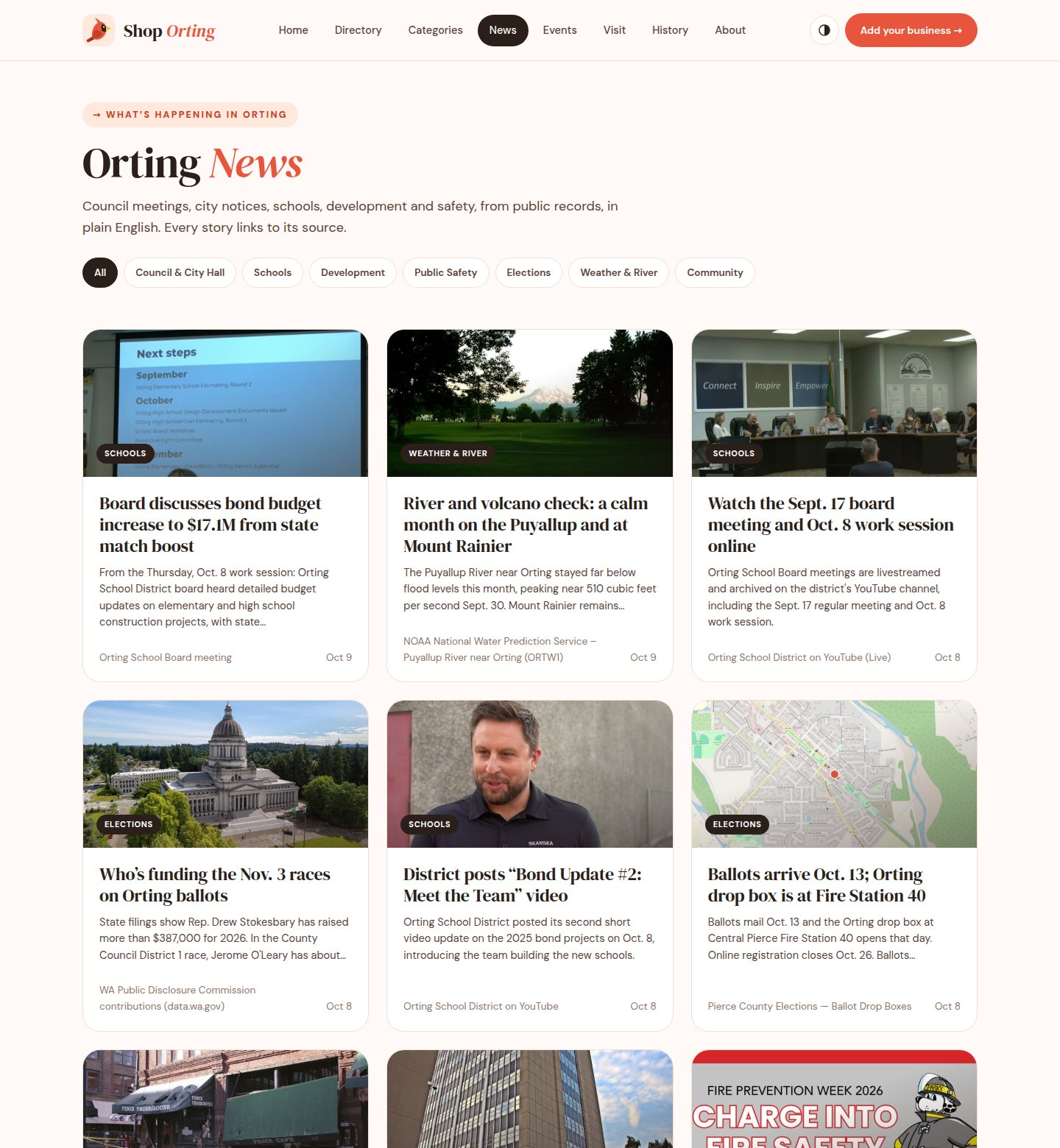
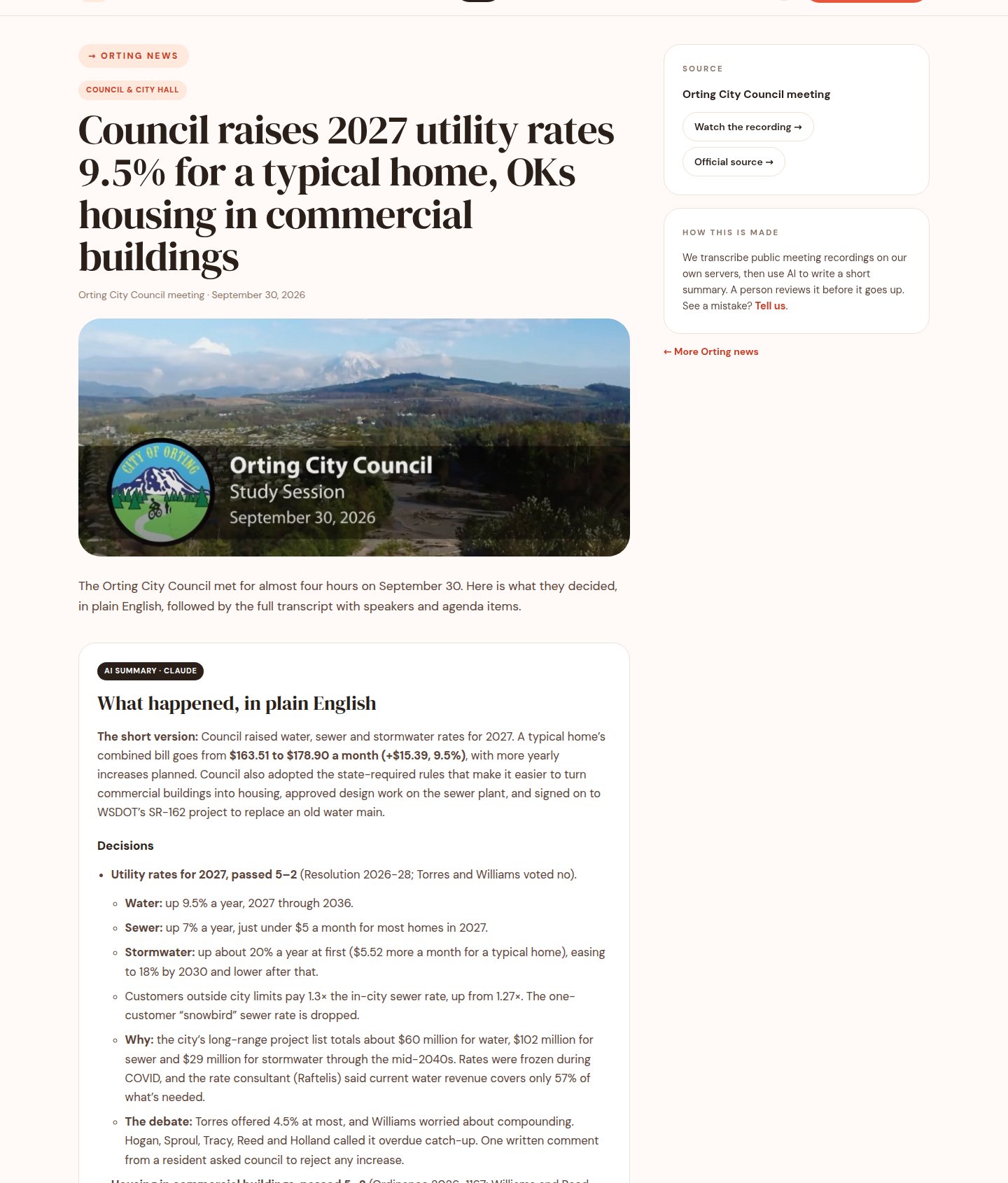
So we added Orting News to Shop Orting, our free community site: shoporting.org/news. It collects public records from the city, the county, the school district, the fire department and the Weather Service, and turns them into short stories in plain English. Every story links to its source. Council and school board meetings come with an AI summary and the full transcript, so you can check the summary against what was actually said.
This post is the tour: how the polling works, how a four-hour meeting becomes a readable story, the guardrails we put on the AI, and how we keep an eye on all of it.
🧭 The pipeline at a glance
The whole thing is a small Python worker plus a WordPress site. Once an hour, the worker checks each source, turns anything new into a story and saves it as a draft. A person reviews every draft from a Discord message before it goes live.
public sources ─► poll (hourly) ─► rules ─► dedupe ─► image ─┐
                                                             ▼
new council or school board meeting                        draft
  └─► GPU: Whisper ─► who's talking ─► AI summary ──────────►│
                                                             ▼
                                Discord: Publish / Edit / Reject
                                                             ▼
shoporting.org/newsA few principles shaped everything else:
- Public records only. Every story starts from something a public agency published, and every story links back to it.
- Plain English, no spin. Stories say what happened. Meeting summaries never say a measure “passed unanimously” unless someone in the meeting said so.
- A person approves everything. The AI drafts; it never publishes.
- Self-hosted. Transcription runs on our own GPU, not a paid cloud API, so a four-hour meeting costs us a few minutes of electricity.
📡 Polling: once an hour, politely
The sources are ordinary public feeds: the City of Orting’s RSS feed, the state’s environmental review (SEPA) register, Central Pierce Fire & Rescue and Pierce County news, the school district’s announcements and YouTube channel, National Weather Service alerts for Orting, and the county TV station’s council meeting archive.
We started with one run a day, at 5pm. But a notice posted at 9am shouldn’t wait eight hours to show up, so we moved to hourly. The worker runs from a systemd timer, not WordPress’s built-in cron, because WordPress cron only fires when someone visits the site:
# /etc/systemd/system/so-news.timer
[Unit]
Description=Run Orting News hourly

[Timer]
OnCalendar=hourly
Persistent=true

[Install]
WantedBy=timers.target
# /etc/systemd/system/so-news.service
[Unit]
Description=Orting News hourly run
After=network-online.target mariadb.service
[Service]
Type=oneshot
EnvironmentFile=/etc/so-news.env
TimeoutStartSec=4h
ExecStart=/opt/so-news-venv/bin/python /usr/local/lib/so-news/so_news.pyType=oneshot with a long timeout matters: a meeting transcription can take a while, and systemd won’t start the next hourly run while the last one is still going, so runs never pile up.
Going from daily to hourly changed two things beyond the schedule:
- Quiet when there’s nothing to say. The daily run always posted a “0 drafts, no errors” summary to Discord. Hourly, that’s 24 pings a day of nothing. Now a run only speaks up when it finds a story or hits an error.
- Retries spread out. A meeting gets three tries at transcription. Hourly, a GPU server that’s down for one evening would have used all three in three hours. Now a failed meeting waits at least six hours before the next try.
We’re also careful about how we poll. The worker identifies itself with a User-Agent that names the site and a contact email, makes one request per source per run, and never retries around a 403, a rate limit or a captcha. When a site blocks automated requests, we ask the owner for access instead of trying to get around the block.
🧹 Rules, dedupe and the duplicate we shipped anyway
Each source has a small parser that turns its feed into the same shape: an ID, a title, a date, a link and maybe an image. Simple rules then decide the category (council, schools, safety, development…) and write the story text. Parsers and rules are pure functions, tested against saved copies of real feeds, so a change to one source can’t quietly break another. The worker has 76 automated tests.
Dedupe works by source ID: every story stores where it came from (youtube:<video id>, sepa:<number>, and so on), and the worker skips anything it has already seen. A normalized-title check catches the same notice posted twice under different IDs.
That still let one through. When we launched, we imported the first month of stories with a one-off script, and that script never saved source IDs. The next morning, the pipeline found a school district video we’d already imported, couldn’t match it, and drafted it again. It never went live, because a person caught it in review. We backfilled the missing IDs. The lesson: any path that creates content has to write the same dedupe keys as the main path, including the “just this once” scripts.
🎙️ From a four-hour meeting to a readable story
Council meetings are where the real decisions happen, and they’re the hardest part. Here’s what happens when a new recording appears:
- Transcribe on our own GPU. The audio goes to a server in our rack with an NVIDIA GTX 1660 Super, running Whisper (large-v3-turbo). It transcribes about 15 times faster than real time. Our first try at a full four-hour meeting ran out of memory, so the job now cuts the audio into 30-minute chunks and stitches the timestamps back together.
- Work out who’s talking. A voice model groups the speech into speakers. Then we put names to them, using the meeting’s own cues: the mayor introduces themself, and when the chair says “Council Member Reed?”, the next new voice is probably Council Member Reed. Voices we’ve identified before are remembered for next time. Anyone we can’t identify stays “Speaker 3”, and short replies like “Aye” are left unlabeled.
- Summarize with an AI model. A language model reads the labeled transcript and writes a short summary: the decisions, what was only discussed, and the topics of public comment.
- Save it as a draft with the summary on top, the full transcript below and a chapter list to jump to each agenda item.
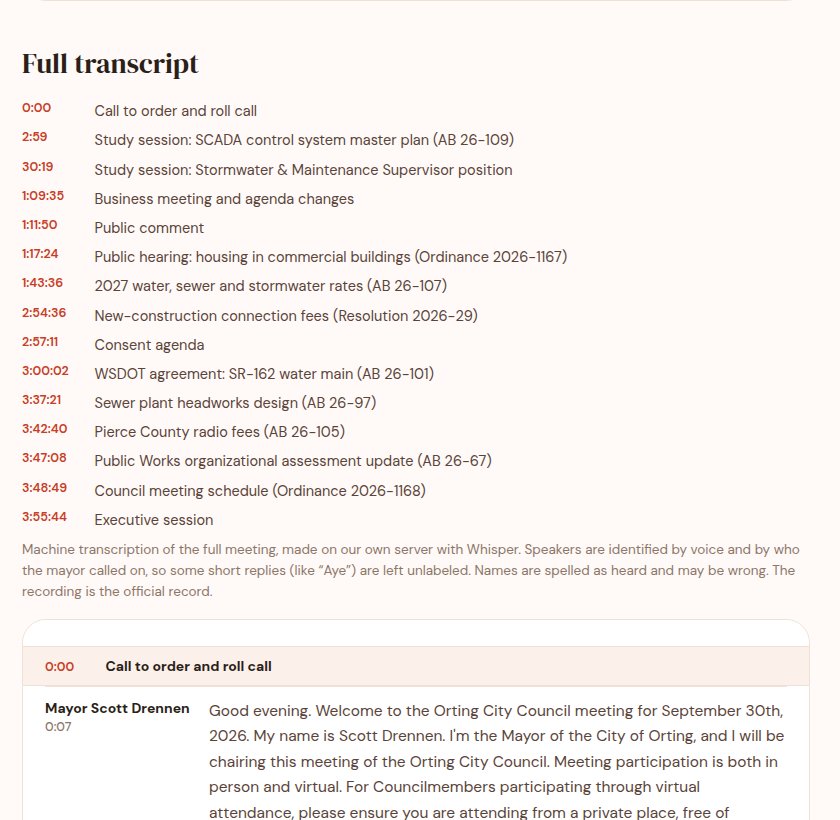
One speaker-naming lesson: early on, a single stray “Council Member…” cue put the name of a council member who was excused that night on someone else’s voice. Now a lone cue only counts for a speaker who talks a lot; quiet speakers need more evidence or stay unnamed. A wrong name is worse than no name.
🛡️ Guardrails on the AI
A summary of a public meeting has to be right, and language models are confident even when they’re wrong. So the instructions are strict, and the code double-checks the result instead of trusting it:
- Only facts from the transcript. Every dollar figure and percentage in the summary must actually appear in the transcript. If one doesn’t, the draft is flagged.
- Discussed is not decided. The headline can only say “approves” or “passes” for something that was voted on. If the summary lists the item under “discussed, no vote yet”, the draft is flagged.
- No invented votes. If the clerk didn’t read out a count, it’s “passed on a voice vote”. It’s never “unanimous” unless someone in the meeting said “unanimous”.
- No private residents’ names. Officials can be named. People who speak during public comment are described by topic, not by name.
# After the AI writes the summary, check it against the transcript.
have = _norm(' '.join(seg[2] for seg in segments))     # everything that was said
figures = _figures(html.unescape(summary))              # $ amounts and percentages
flags = [f'Figure not found in transcript: {f}'
         for f in sorted(figures) if _norm(f) not in have]
if re.search(r'\bunanimous', summary, re.I) and 'unanimous' not in have:
flags.append('Says "unanimous", but nobody said that in the meeting')Flags don’t block a draft. They show up in the Discord review message, right next to the Publish button, so the reviewer knows exactly what to check.
✅ A person approves every story
Nothing publishes on its own. Each draft arrives in Discord with its headline, image, excerpt, any flags and three links: Publish, Edit and Reject. Publish and Reject work in one click from a phone.
One-click links that change a website need care. Each link carries a signature made with a secret only the server knows, and it only works for someone logged in with permission to publish:
/** Signed Publish / Reject links for a draft.
 *  Valid only for a logged-in user who can publish. */
function so_news_review_links( $id ) {
	$sig = fn( $do ) => substr(
		hash_hmac( 'sha256', "$id|$do", wp_salt( 'auth' ) ), 0, 32 );
	$url = fn( $do ) => add_query_arg( [
		'action' => 'so_news_review', 'post' => $id,
		'do'     => $do,              't'    => $sig( $do ),
	], admin_url( 'admin-post.php' ) );
	return [
		'publish' => $url( 'publish' ),
		'reject'  => $url( 'reject' ),
		'edit'    => admin_url( "post.php?post=$id&action=edit" ),
	];
}If someone forwards the Discord message, the links are useless to them: they’d still have to log in as an editor, and a link for one story can’t be changed to act on another.
🗓️ Newsroom standards, written in code
Running a news feed means making the same editorial calls that newsrooms do, and making them every time. We wrote these into the pipeline:
- Say when it happened. The school district posts board meeting videos a day or more after the meeting. When a meeting happened before the story’s date, the card starts with “From the Thursday, Oct. 8 work session:” and the story says when it was held and when the video came out.
- Say when it’s an update. If a new story covers the same thing as a recent one, it opens with “Update: this follows our Sept. 30 story”, linked. When it’s published, the earlier story is marked Updated with a link forward.
- “Updated” is set on purpose. The story page shows Published … · Updated … under the headline. Cards don’t. It’s never driven by “last modified”, so fixing a typo doesn’t make a story look like news.
- Corrections are visible and dated. When we get a fact wrong, the story gets a dated Correction note at the end. We don’t quietly edit the mistake away.
Matching “is this the same story?” is deliberately conservative: a new headline has to share most of its key words with a recent one. It misses some loose follow-ups, but it doesn’t invent connections. And it’s only a suggestion: the reviewer sees the flag before anything goes live.
def mark_update(s, recent):
    """Does a recent story cover the same thing? (most headline words shared)"""
    a, best = _words(s['title']), None
    for pid, title, date, url in recent:
        b = _words(title)
        shared = len(a & b)
        # exact duplicates were already skipped by source ID and title
        same = norm_title(title) == norm_title(s['title'])
        if not same and shared >= 3 and shared / max(1, min(len(a), len(b))) >= 0.6:
            if not best or shared > best[0]:
                best = (shared, pid, title, date, url)
...🌊 The data that can’t go stale
Orting sits between two rivers and below Mount Rainier, so the site’s “Be ready” page carries live hazard data: Puyallup and Carbon river gauges from NOAA, Mount Rainier’s alert level from USGS, Weather Service warnings and nearby earthquakes. Those feeds refresh every 15 minutes, separately from the news worker.
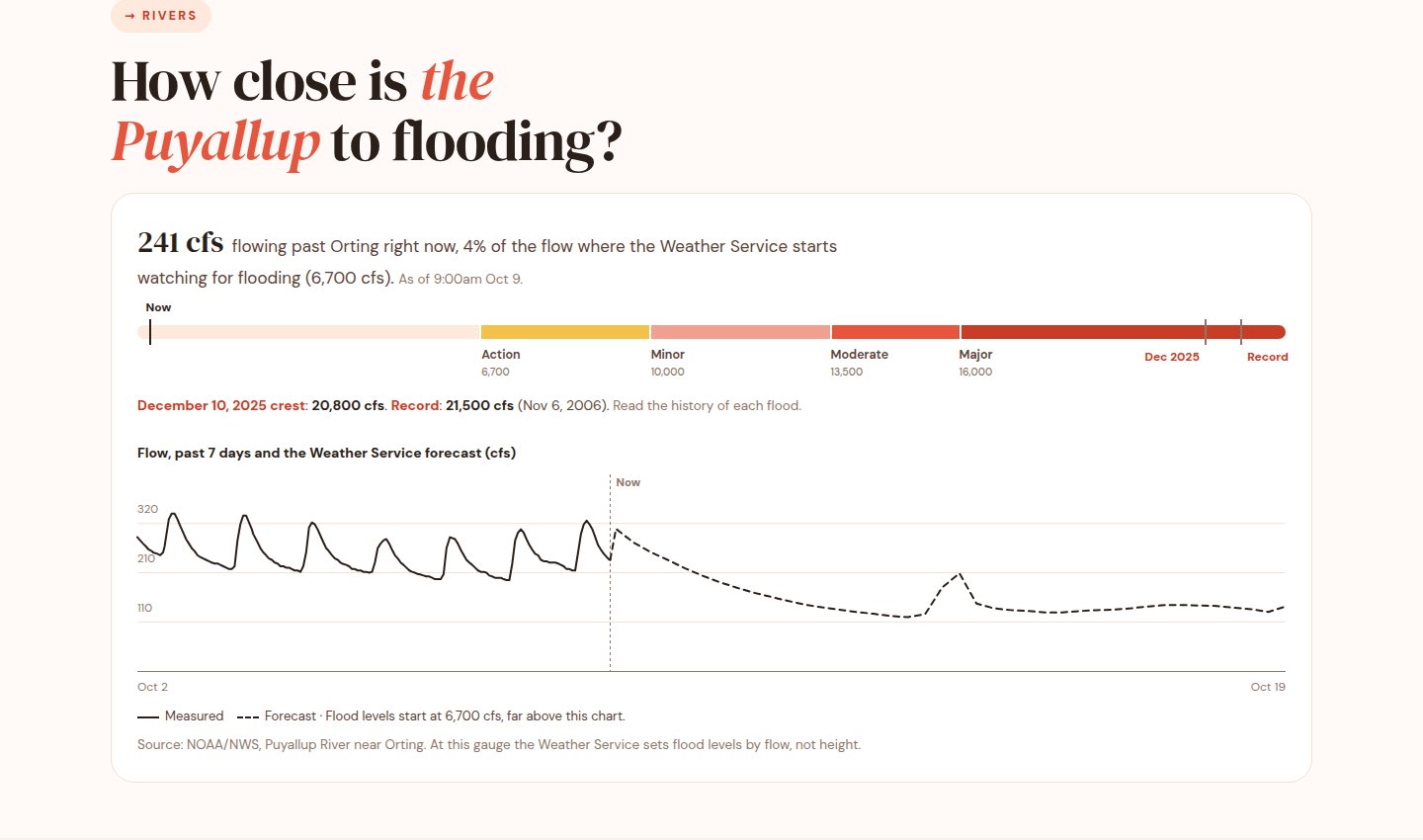
Stale safety data is worse than none, so the graphic hides itself when the gauge data is more than six hours old. That raises the monitoring question: a page can load perfectly and still be missing the one thing people came for.
📈 Watching the watchers
Shop Orting is now a public resource, so it gets the same monitoring as our client systems, in layers:
- Is the site up? Prometheus’s blackbox exporter checks the home page, /news and /be-ready every minute, along with the TLS certificate. A failure for five minutes opens a ticket in our helpdesk and sends an email. Uptime Kuma checks the same pages independently and posts to Discord.
- Is the data there? A content check loads /be-ready and fails unless the live river reading is on the page.
- Is the server healthy? Disk, memory and CPU, plus an SSH check.
- Are the jobs running? Alerts fire if any of the site’s jobs fails, or if the hourly news timer hasn’t fired in three hours.
The content check is the one we like best, because it catches the failure that “is the site up?” can’t:
# blackbox.yml: the page must contain the live river reading
http_shoporting_river:
  prober: http
  timeout: 10s
  http:
    valid_status_codes: []   # 2xx
    fail_if_body_not_matches_regexp: ["cfs</b> flowing past Orting"]
# Alert rules
- alert: ShopOrtingRiverDataStale
expr: probe_success{job="blackbox-content"} == 0
for: 15m
labels: { severity: critical }
annotations:
summary: "shoporting.org/be-ready is not showing live Puyallup river data"
- alert: ShopOrtingTimerStalled
expr: >-
time() - node_systemd_timer_last_trigger_seconds{
instance="shoporting", name="so-news.timer"} > 3 * 3600
for: 10m
labels: { severity: warning }The timer check uses node_exporter’s systemd collector, which reports when each timer last fired. A news run only lasts a few seconds, so checking whether the service is “running” would almost never catch it. “When did the timer last fire?” is the question that actually tells you something is stuck.
🧠 What we learned
- Write the same keys from every path. Our only duplicate came from a one-off import script that skipped the dedupe ID.
- “Published” isn’t “happened”. Upload dates, meeting dates and story dates are three different things. Say which one you mean.
- Check the model’s work in code. Instructions reduce mistakes; checks catch the rest and tell the reviewer where to look.
- A wrong name is worse than no name. When in doubt, “Speaker 3”.
- Chunk long jobs. A four-hour recording in one pass ran out of memory; 30-minute pieces don’t.
- Monitor what people came for, not just whether the server answers.
- Keep a person in the loop. Review takes a minute a day, and it’s why we can trust what goes out.
💬 Want something like this?
Orting News is free, and it’ll stay free. The pieces underneath it are the same ones we use every day: polling and integrations, self-hosted AI, monitoring, and automation with a person in the loop. If your organization has information scattered across a dozen places, or meetings nobody has time to watch, let’s talk.
You can read Orting News at shoporting.org/news. See a mistake? Every story has a link to tell us, and we’ll correct it, with a dated note.




Protected by reCAPTCHA. Google's Privacy Policy and Terms apply.