À La Carte Security

Enterprise-Grade Security, À La Carte.

The same managed-security stack we run for our flat-rate clients — EDR, identity protection, automated patching, remote monitoring — sold per device, per month. No contracts. No bundles you don't need. Cancel anytime.

24/7 human SOC ~8-minute average SOC response Billed on what's actually installed
1

Configure

Pick the products you want and how many of each. Each product is priced on its own quantity — one product's volume never changes another's rate.

2

Pay

Card on file, billed monthly. Your invoice tracks what's actually installed — add a laptop mid-month and it just shows up on the next cycle.

3

Install

One installer with your products baked in. Run it on each machine — a few minutes per machine, no on-site visit, no reimaging.

4

We watch

From that point on it's a 24/7 SOC on your endpoints, automated patching on your schedule, and monitoring that flags problems before they're outages.

See every step before you buy: the help center walks through ordering, installing and getting support. No sign-in needed.

Huntress Authorized Partner
Huntress Managed EDR · from $7.50/endpoint/mo

A 24/7 human SOC watching every endpoint

Huntress EDR isn't just software — behind the lightweight agent (Windows, macOS, and Linux) sits a 24/7/365 human Security Operations Center with an average response time of about 8 minutes from alert to verified incident report or closure. The agent continuously hunts for persistence footholds — the mechanisms attackers use to survive reboots and stay hidden — and plants ransomware canary files on every protected endpoint, so the moment anything starts encrypting, a SOC investigation opens immediately.

Real analysts verify every detection

SOC analysts review alerts before they ever reach you. Huntress's incident reports carry a false-positive rate under 1% — you act on signal, not noise.

SOC-initiated host isolation

On a confirmed threat, Huntress' analysts can isolate the host — or the whole organization — so it can only talk to Huntress. A human validates first, so a false positive never locks up your server.

Incidents land in our ticketing

Every incident report arrives with step-by-step remediation. We work it with you — you're never handed a raw alert stream to triage alone.

Managed Microsoft Defender included

Huntress manages and monitors Microsoft Defender — AV health, scan status, signature updates — across every protected endpoint, at no extra charge.

~8 min

average SOC response time — from alert received to incident report sent or alert closed

<1%

false-positive rate on incident reports — human-verified before you ever see them

5M+

endpoints protected by the Huntress platform worldwide

Figures published by Huntress, 2026.
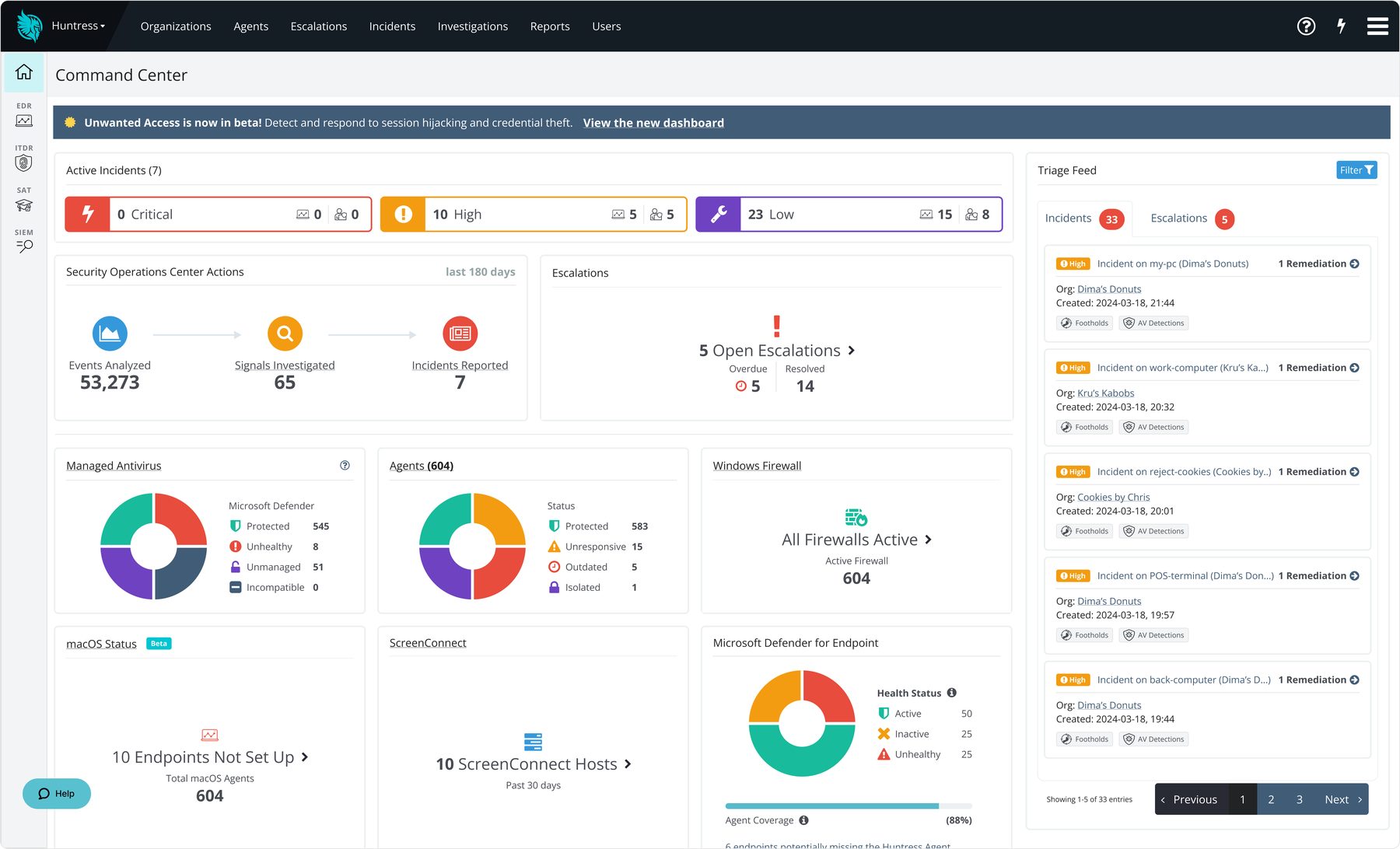
Huntress Command Center dashboard
Huntress Command Center — the live console behind your EDR: every endpoint, every detection, and every SOC analyst response in one view. Your monthly reports are pulled straight from here.
Huntress Authorized Partner
Huntress Managed ITDR · from $9.00/identity/mo · $195 one-time setup

Attackers don't break in. They log in.

Modern business compromise increasingly starts with a Microsoft 365 account, not a machine — 67% of organizations report a rise in identity-related incidents over the past three years. Huntress Managed ITDR connects directly to your M365 tenant — set up in minutes, no endpoint agent required — and puts the same 24/7 SOC behind every licensed identity. It works without expensive premium Microsoft licensing tiers, and it correlates signals (a new inbox rule plus a login from unexpected infrastructure) before anyone gets alarmed.

Session-token theft

Detects attackers who steal session tokens — the digital keys that keep users logged in — and import them into their own browsers. No password needed, which is exactly why passwords alone can't catch it.

Shadow Workflows

Flags malicious inbox rules attackers plant to hide their tracks — auto-forwarding or deleting mail, watching for keywords like "invoice," or shunting messages into folders nobody reads.

Rogue Apps

Catches malicious or abused OAuth applications that have been granted access to your tenant — an attack vector Huntress measured more than doubling year over year in its 2026 threat report.

Unwanted Access

Spots logins from suspicious locations and unauthorized VPN or proxy infrastructure — and the SOC confirms real compromise before waking anyone up.

Nothing to install. ITDR isn't an endpoint agent — it connects straight to your Microsoft 365 tenant, and as a Microsoft Cloud Solution Provider (CSP) we handle the onboarding and admin consent for you. That one-time tenant setup is a flat $195 per tenant; after that you're billed per identity, volume-tiered exactly like the endpoint agents.

10M+

Microsoft 365 identities protected by Huntress ITDR

93,000+

organizations protected across the Huntress platform

Minutes

to deploy — a direct M365 tenant connection starts streaming identity events almost immediately. No agent, no reboot, no user disruption.

Figures published by Huntress, 2025–2026.
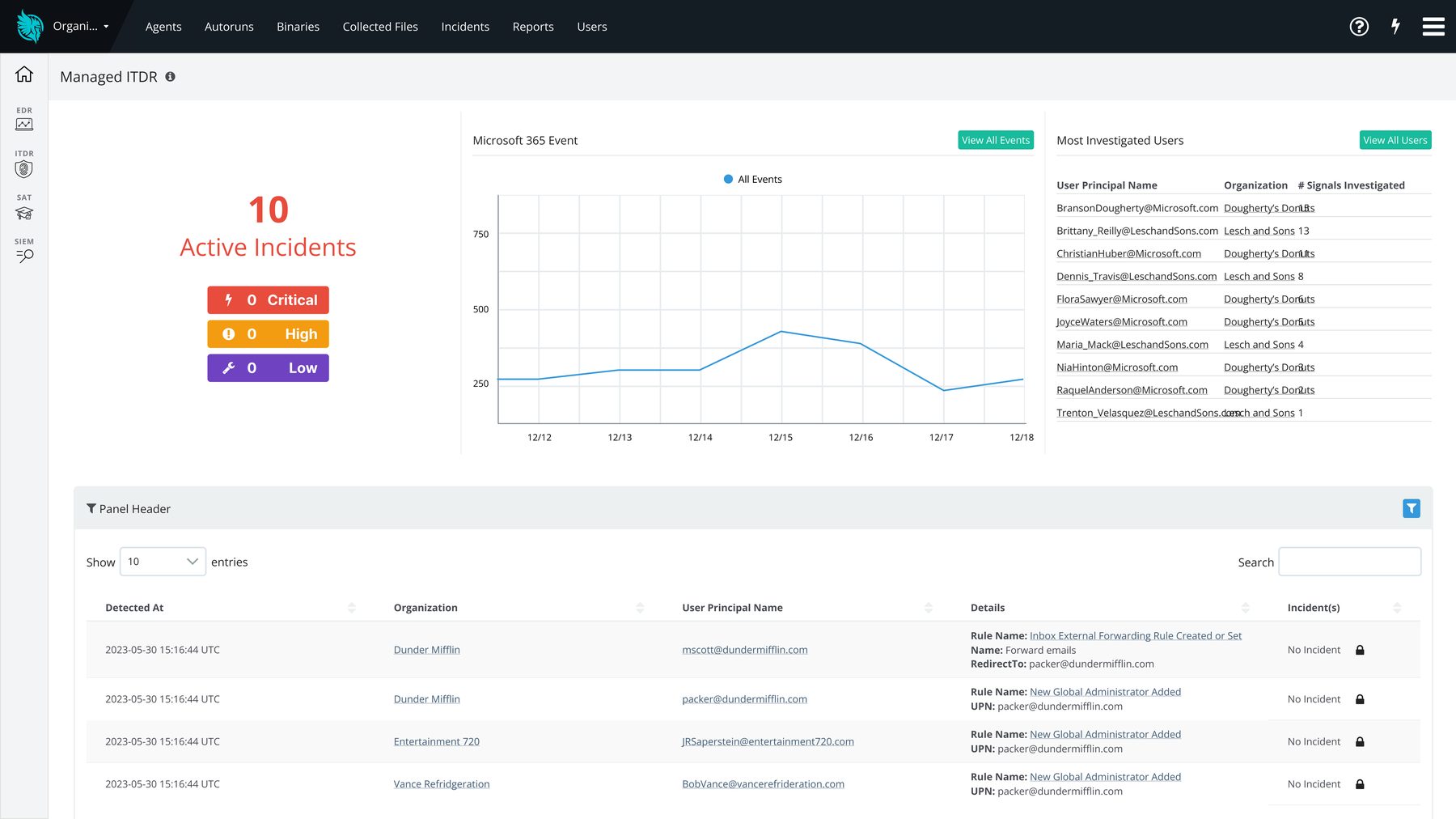
Huntress Managed ITDR identity dashboard
Managed ITDR — your Microsoft 365 identities watched 24/7 for stolen session tokens, rogue OAuth grants, suspicious sign-ins, and malicious inbox rules.
Bitwarden MSP Partner
Bitwarden Password Manager · $9.00/user/mo

One stolen password shouldn't open your whole business

Stolen logins are behind more than a third of breaches. We give every employee a Bitwarden vault, enforce two-step login, and set up recovery so nobody gets locked out — then hand you the controls in your Client Portal, where you add and remove people and see who can open what.

A unique password for every account

Bitwarden generates and fills strong passwords in the browser and on phones, so nobody reuses one — and nothing lives in spreadsheets or sticky notes.

Two-step login and recovery, set by policy

We turn on two-step login for everyone and enroll them in account recovery, so a forgotten master password is a quick fix instead of a lost vault.

Shared folders, end-to-end encrypted

Teams share logins through folders you control. Everything is encrypted on the device — Rainier IT can't see what's stored.

Run it from your Client Portal

Add or remove people in one click, see who has two-step on and who can be recovered, check "who sees what", and export the activity log.

36%

of breaches involved the use of stolen credentials

97%

of identity attacks are password attacks

99%

of identity-based attacks can be blocked by multifactor authentication

Verizon 2026 Data Breach Investigations Report; Microsoft Digital Defense Report 2025.
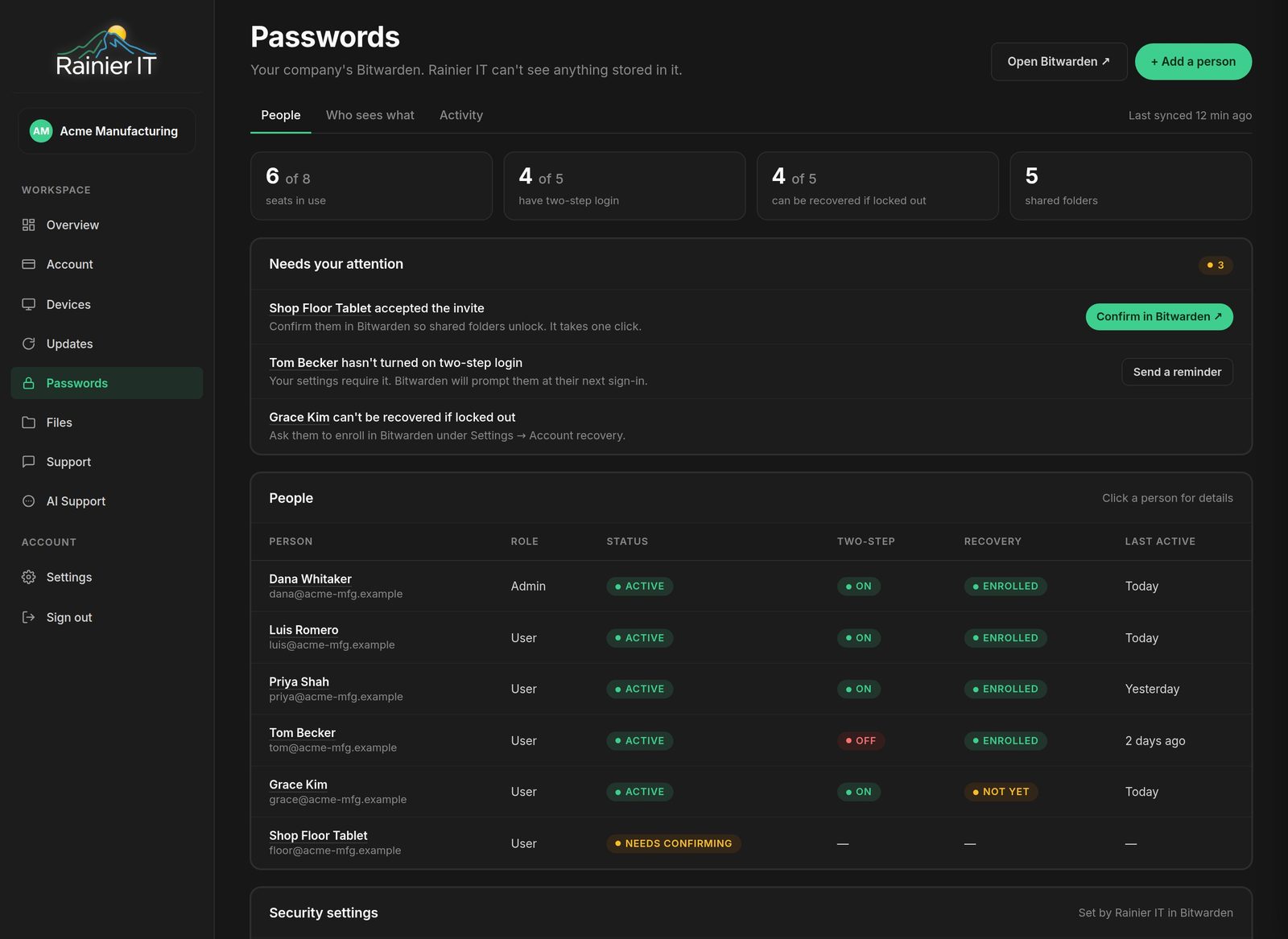
Sample data: a Client Portal Passwords page listing six people with their two-step login and recovery status, seats in use, and items that need attention
Your Client Portal's Passwords page — who's in, who has two-step on, who can be recovered, and what needs your attention. Sample data.

Bitwarden is a trademark of Bitwarden, Inc.

Action1 Action1
Action1 Patch Management · $6.00/endpoint/mo

Every patch, every app, on your schedule

Unpatched software is an open door for opportunistic attacks. We run Action1 to automate Windows updates and third-party application patching from one console — with a live, per-device view of every known vulnerability in your fleet, prioritized by CVSS score, CVE, and whether CISA has flagged it as actively exploited. You see exactly what's exposed and watch it close.

200+ third-party Windows apps

Browsers, Adobe, collaboration tools, and more — patched from a repository built and maintained by Action1's own patch team, not a community feed.

Real-time CVE tracking per device

Vulnerabilities identified in real time and prioritized by CVSS score, CVE, and CISA Known Exploited Vulnerabilities status — with audit-ready reports your cyber-insurer will actually accept.

Maintenance windows, not interruptions

Patching runs in windows you approve; reboots get scheduled for when nobody is logged in. Security updates auto-approve while feature updates wait for review.

Cloud-native, bandwidth-smart

Work-from-home machines patch exactly like office machines — no VPN required — and peer-to-peer distribution lets agents on the same network share downloads, limiting bandwidth per subnet.

200+

third-party Windows applications in Action1's vendor-maintained patch repository

CISA KEV

active-exploitation flags on every vulnerability — so the patches that matter most go first

P2P

patch distribution — agents share package segments on the local network instead of each pulling from the cloud

Capabilities per Action1 product documentation, 2026.
Remote Monitoring & Support · $2.50/endpoint/mo

Eyes on every machine — and hands when you need them

Our remote monitoring agent runs on infrastructure we host and administer ourselves — not a third-party multi-tenant cloud — watching disk space, Windows services, event logs, CPU, and memory on every enrolled machine, and alerting us when thresholds are crossed. It's the difference between "the server ran out of disk Saturday night" being a Monday-morning disaster and a ticket we already closed. And because the agent is on the machine, when something does break we can fix it hands-on, remotely, the same day.

Proactive monitoring

Automated checks on disk space, services, event logs, CPU, memory, and custom script output — problems get flagged before they become outages.

Scripted, scheduled maintenance

Cleanup jobs, service restarts, and routine fixes run in the background on a schedule — without interrupting whoever's at the keyboard.

Remote access with permission

Secure attended remote control — your user is notified or asked for consent before a technician connects. No silent screen-watching.

Self-hosted, your data stays put

The monitoring platform runs on Rainier IT-controlled infrastructure. Monitoring data and remote-access pathways stay under our administration — not a vendor's.

$95/hr remote

On-demand remote hands

With the agent installed, you skip the "can someone come out?" wait entirely. Something's broken? We remote in — with your permission — and fix it hands-on at $95/hr, billed in 15-minute increments. No site visit, no travel charge, no hour minimum.

15 min

billing increments on remote support — a quick fix costs like a quick fix

Add-on · Security Posture Report

Proof, not promises.

A security stack you can't see is a security stack you have to take on faith. The Security Posture Report is a PDF in your inbox — weekly or monthly — showing exactly what's protecting your business right now: which machines are covered, which aren't, and what's still exposed. It covers the services in your plan, so add it alongside EDR, Remote Monitoring or Patch Management. Hand it to your cyber-insurance carrier, your board, or your biggest client's vendor-risk questionnaire.

Monthly $15/mo · Weekly $25/mo — flat fee, any fleet size.

What a report shows
  • Agent status across your fleet — what's checking in, what's gone quiet
  • Microsoft Defender health — protection status and signatures (with EDR)
  • EDR coverage — which endpoints the SOC can actually see (with EDR)
  • Patch & CVE posture — missing updates and open vulnerabilities by severity (with Patch Management)
  • Since your last report — counts compared with the previous report, such as vulnerabilities fixed
Client Portal

Every plan includes the Client Portal.

This tour shows the full managed portal. Order here and your portal shows the services you bought, with your installers, billing and your own help page.

Example company, sample data. Watch on YouTube

Live pricing

Build your stack.

Each product is priced on its own quantity — Huntress EDR and ITDR earn volume discounts as you scale; patching and monitoring stay flat per device. You're never locked in — billing follows what's actually installed.

Huntress
$11.00 per endpoint · cheaper from 11+

A 24/7 human SOC behind a lightweight agent on every Windows, macOS and Linux machine.

  • Analysts verify every detection
  • Host isolation on a confirmed threat
  • Manages Microsoft Defender for free
~8 min average SOC response · <1% false positives

Huntress ITDR for Microsoft 365 — set up with you · Ask about ITDR →

Action1
$6.00 per endpoint

Windows and 200+ third-party apps patched on your schedule, with live CVE tracking per device.

  • CISA "actively exploited" flags first
  • Maintenance windows you approve
  • Works for home PCs, no VPN
Per Action1 product documentation, 2026
Rainier IT Monitoring
$2.50 per endpoint

Our self-hosted agent watches disk, services, logs, CPU and memory, and alerts us first.

  • Microsoft Defender hardening: CIS Level 1 baseline + 13 attack surface reduction (ASR) rules
  • Remote access only with your permission
  • Device status in your Client Portal
  • Data stays on Rainier IT infrastructure
+ Remote hands at $95/hr — we fix it remotely, wherever the PC is. 15-min increments.
Bitwarden
$9.00 per user

A business password vault for every employee, set up and managed by us — and run by you from your Client Portal.

  • Unique, generated passwords for every account, filled in automatically
  • Shared folders by team; nobody passes passwords in email or sticky notes
  • Two-step login and recovery, set by policy
  • Run it from your Client Portal
PDFREPORT
$15/mo monthly · $25/mo weekly

Proof, not promises: a PDF showing exactly what is protecting your business right now.

  • Agent status: what checks in, what went quiet
  • Defender health and EDR coverage, with EDR
  • Open vulnerabilities by severity, with Patch Management
Ready for your cyber-insurer or a vendor-risk questionnaire
Included

Included with every plan: Threat Watch alerts. We watch the software on your computers and email you when something you run is being exploited, plus a weekly Wednesday brief.

Remote support

Something broke? We fix it remotely — wherever the computer is.

With our Remote Monitoring & Support agent on a machine, we usually see the problem before you do. When you need hands-on help, we connect with your permission and fix it on the spot — at the office, at home, or on the road.

Watching 24/7Disk, services, logs, CPU and memory alerts reach us around the clock.
Fixed remotelyNo site visit or travel charge. Your user is asked before we connect.
Hands-on hoursMon–Fri 8am–6pm PT · emergency incident response as needed
What you needOur monitoring agent on the device · $2.50 per endpoint/mo
Remote hands $95/hr Only when you ask us for help
Billed in 15-minute increments

Needs our monitoring agent on the device · $2.50 per endpoint/mo
Add Remote Monitoring →
Frequently asked

Things people ask before buying.

How does billing actually work?

Your invoice follows what's actually installed. We bill against live agent counts — add three laptops mid-month and they appear on the next cycle; retire a machine and it drops off. The configurator above is a quote, not a commitment to a fixed count.

Why does ITDR have a one-time setup fee?

The endpoint products (EDR, patching, monitoring) self-install from one agent — there's nothing to set up by hand, so there's no setup fee. ITDR is different: it's a direct connection to your Microsoft 365 tenant, not an agent. We onboard it for you — establishing the integration, granting admin consent as your Microsoft Cloud Solution Provider (CSP), enabling the audit logging Huntress needs, and verifying it's healthy. That's a flat $195 one-time fee per Microsoft 365 tenant, regardless of how many identities you protect. Ongoing protection is then billed per identity per month.

What's the difference between an endpoint and an identity?

An endpoint is a physical or virtual machine with an agent on it — a workstation, laptop, or server. An identity is a licensed Microsoft 365 user. EDR, patching, and monitoring are billed per endpoint; ITDR is billed per identity and needs no endpoint agent at all — it connects directly to your M365 tenant.

Can I cancel?

Anytime, effective at the next billing cycle. No early-termination fee, no contract to buy out. We uninstall the agents cleanly and hand you an exit summary of what was covered.

How does the volume tier work?

Each product is priced on its own quantity. Huntress EDR and ITDR get cheaper as you add more (tiers at 11, 26, 51 and 101+); patching and monitoring stay flat per device. Buying more of one product never changes another product's rate.

Do I have to buy all four?

No — that's the point of à la carte. That said, they're designed to layer: EDR watches for intruders, ITDR watches your M365 accounts, patching closes the holes they come through, and monitoring catches the ordinary failures in between. Most clients start with EDR and add from there.

What if I'd rather have all of it just… handled?

That's our managed plans. Flat per-user pricing that includes this entire security stack plus unlimited remote support, a hardened security baseline, backups, and onboarding. Compare managed plans →

Prefer it fully managed?

À la carte covers the tools. Managed plans cover everything else.

Every managed plan includes this entire security stack — plus unlimited remote support, a hardened Windows security baseline, encrypted daily backups, free onboarding, and a monthly health report. If you'd rather never think about any of this again, that's the plan to pick.

$99
per user / month, all-in Compare managed plans

Not sure what you need?

30-minute call, free, no commitment. We'll listen, ask about your environment, and recommend the smallest stack that actually solves the problem.

Get a recommendation